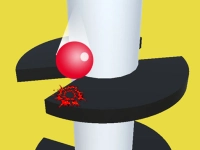
Why the helix ball label groups vertical arcade picks
As a mechanic tag, helix ball groups titles connected by a repeated action: steering a ball downward through spiral structures while avoiding holes and timed hazards. Typical goals include surviving longer stretches, adjusting speed to match lane rotation, and collecting minor pickups that affect score. Pacing stays fast, sessions are brief, and device fit is strong on both phone and desktop when controls respond well.
How to pick helix ball titles by mood and session length
Choose slower-paced spiral rolls when time is limited, pick reaction-heavy variants for sharper challenge, and prefer touch-friendly layouts on mobile browsers, casual desktop play, or quick no-download sessions.
Core loop, feedback, and access fit for helix ball browser titles
The core loop in these browser titles is simple: rotate the structure or steer the ball, react to incoming gaps, and keep momentum steady as speed increases. Feedback comes from clean audio cues, visual lane shifts, and immediate restart after failure, which keeps pacing tight. Access-wise, many helix ball titles are lightweight HTML5 builds that load quickly, run in-browser, and need no installer, which suits short breaks and shared devices. Desktop play often uses keyboard or mouse rotation, while mobile browser play usually favors tap or swipe input. Performance stays reasonable on mid devices, though very old hardware may show frame dips.
Picking advice and control safety for spiral lane play
Start with slower speed settings when available, focus on lane rhythm over score chasing, and maintain steady timing through rotation changes to reduce missed gaps. If controls feel stiff, switch to another title since input quality directly affects spiral lane play. Use headphones for clearer audio cues, and prefer layouts where tap zones are large enough for comfortable play on smaller screens.
Why this tag fits quick arcade browsing and repeat sessions
Players use helix ball when they want short, repeatable runs, straightforward rules, and minimal loading before the first attempt. Replay value comes from mastery of timing, pattern recognition, and personal best chasing rather than long-term progression. It fits quick breaks, travel time, or casual desktop play, and it remains useful when browsing for no-download arcade picks that start fast.
helix ball FAQs
Q: What links the titles under the helix ball mechanic tag? A: They share spiral lane navigation, timing-focused movement, and fast restarts after mistakes.
Q: Do helix ball browser titles need downloads? A: Most run in-browser as lightweight builds, so setup stays minimal on desktop and phone.
Q: How does mobile browser play feel with spiral lane control? A: Many titles use tap or swipe input, which can feel responsive when layouts are clean and buttons are large.
Q: Are helix ball picks good for very short sessions? A: Yes, runs are brief, restarts are quick, and progress depends on timing rather than long missions.